Planned preventative maintenance (PPM) is the scheduled servicing of the plant and safety systems a building depends on: fire detection, extinguishers, exit lighting, air handling, switchboards, lifts, hot water, backflow devices. Software earns its place only if it answers the questions below without a spreadsheet open beside it.
What PPM software has to do
- Which assets does this building have, and which standard governs each one?
- What is due this month, and what is overdue?
- Who is responsible for each discipline, and when did they last attend?
- What was done, and where is the evidence?
- Can all of that be handed to an auditor, a committee or an insurer today?
Most tools answer one or two of these. Work-order systems are built around the contractor and the job ticket. Spreadsheets hold asset names but know nothing about standards or frequencies. Standara is built around the register and the schedule, because that is where the compliance question is actually answered.
How Standara does it
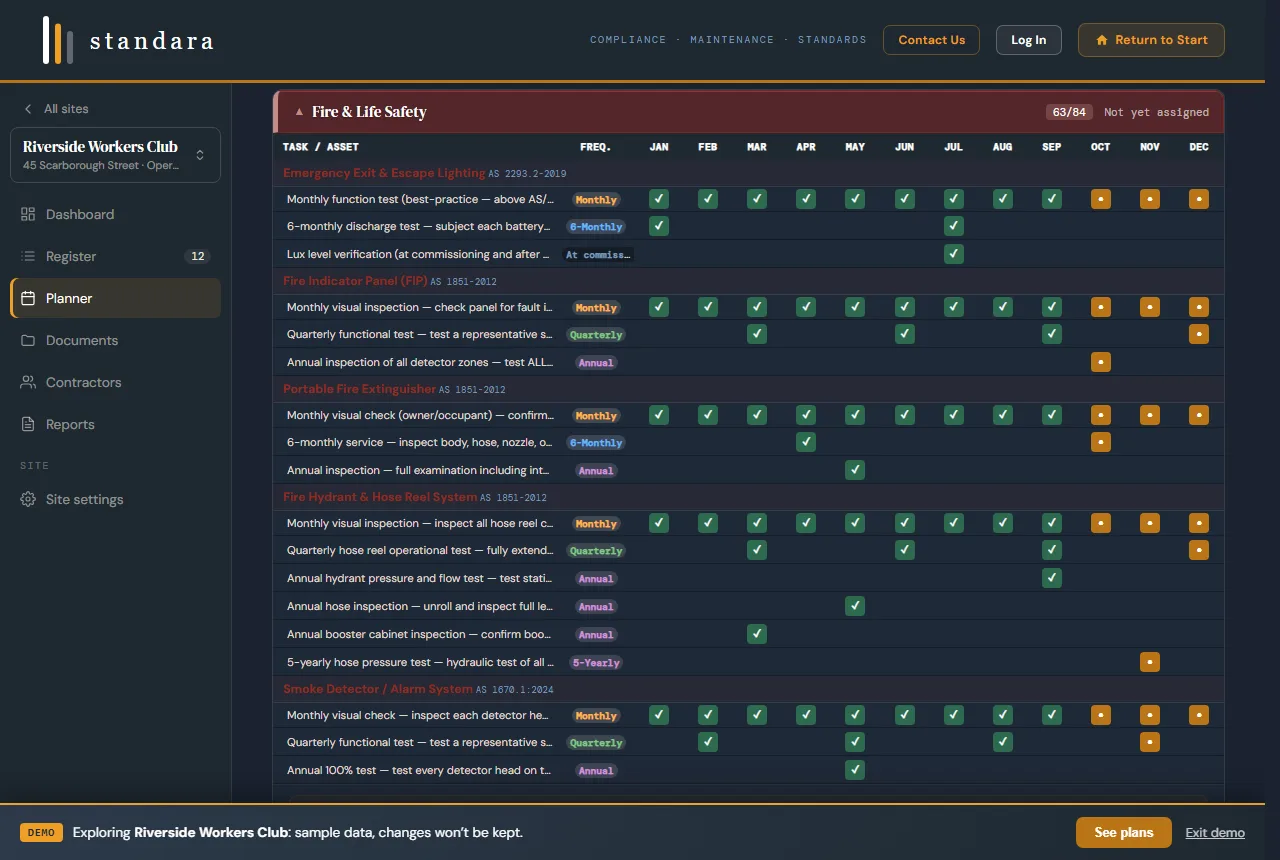
The planner: one row per task, twelve months across, scheduled and completed cells. Demo data.
1. Build the register
Select from 78 asset types across 11 disciplines, including fire and life safety, mechanical and HVAC, electrical, hydraulic and plumbing, vertical transport, security and access, and structure and fabric. Each asset type carries its governing AS/NZS reference. Add the location, quantity and notes for each one on site.
2. Generate the planner
Standara creates the 12-month planner from the register: 350+ recurring tasks with frequencies, task descriptions, trade requirements and statutory flags. Mark each visit complete as it happens. The dashboard shows what is due this month, what is overdue and what is closed out, in that order.
3. Assign contractors
Assign a contractor to each discipline from your directory. Every scheduled task then carries who attends, and the scope of works export gives each contractor their part of the plan in writing.
4. Log reactive work
Callouts get a work order reference, priority, discipline, cost and status, so the reactive history sits beside the planned schedule for the same asset base. The callout log is a Professional plan feature.
5. File the evidence
Upload service reports, certificates and photos against the discipline they belong to. When the annual question comes, the report and the certificate are next to the task they close out.
6. Export the record
PDF compliance report, Excel schedule or CSV data, each carrying the site details, the standards references and the completion status. Send the file to the auditor, the committee or the insurer. Nothing needs explaining.
Standards mapping, by designation
Standara references Australian and New Zealand Standards by designation and maps each asset and task to the applicable one. More than 40 AS/NZS standards are referenced across the library. Standards content is not reproduced; the full documents are available from Standards Australia. Typical mappings in a licensed club or commercial building:
- Fire detection and alarm systems, extinguishers, hydrants and hose reels, sprinklers: AS 1851
- Emergency and exit lighting: AS 2293
- Electrical installations and switchboards: AS/NZS 3000
- RCD and portable appliance testing: AS/NZS 3760
- Mechanical ventilation and air handling: AS 1668, with AS/NZS 3666 for microbial control
- Plumbing, drainage, hot water and backflow prevention: AS 3500
- Lifts and escalators: AS 1735
The frequency for each task comes from the referenced standard, the manufacturer or the site's own risk assessment, and Standara records which. If a standard is revised, the reference is updated in the library, not in your register by hand.
Who it is for
Clubs and RSLs
Licensed venues with kitchens, cool rooms, gaming floors, lifts and function spaces carry every discipline in one building. The board asks about fire safety and the insurer asks about maintenance records. One register answers both.
Strata and body corporate
The committee changes; the building does not. A standards-mapped register gives each new committee the same starting point and gives the strata manager a maintenance plan that survives the AGM.
Commercial property
Owners and property managers with one to three sites need a defensible maintenance record without a corporate CMMS. Standara holds each site separately and exports each one on its own.
Schools and community facilities
Business managers who inherit a campus of plant with no register. The same six steps apply; the register is usually larger and the disciplines fewer.
Spreadsheet, CMMS or Standara
A spreadsheet holds what you type into it. It does not know which standard applies to a fire indicator panel, cannot generate a frequency, and produces no report an insurer will accept without questions.
A CMMS is a work-order system. It is strong on dispatch and job tickets and priced per user, and it puts the contractor at the centre of the workflow. Most one-to-three-site managers use a fraction of it.
Standara starts from the register and the standards, generates the plan, and keeps the evidence with the task. Contractors execute against your scope. It is deliberately simpler than a CMMS because the compliance question is simpler than a dispatch problem.
Plans
Prices are in Australian dollars, plus GST. Standard is $149 per month or $1,489 per year for one site: the asset register, the PPM planner, contractor assignments and the compliance report. Professional is $399 per month or $3,999 per year for up to three sites, with team members, the reactive callout log, service documents and the commissioning and handover module for new builds. Enterprise covers larger portfolios, white-label and single sign-on, by quote. Compare the plans.
Prefer it built for you?
Standara Capture is the done-for-you path. A practising facilities manager walks your site, captures every maintainable asset, builds the standards-mapped register and the 12-month planner, and hands it over live in Standara. Fixed quote after a short scoping call. Servicing NSW and South-East Queensland. Request a scoped quote.
Common questions
Do I need to understand Australian Standards to use PPM software?
No. When you select an asset in Standara, the relevant standard reference, task descriptions and recommended frequencies are generated automatically. You get a standards-mapped maintenance plan without reading a standards document.
How is PPM software different from a CMMS?
A CMMS is built around contractor dispatch and work orders, with the contractor at the centre of the workflow. Standara is built the other way round: you hold the asset register, you generate the plan, you close out the work. Contractors execute against your scope.
Can I manage more than one building?
Yes. Each site has its own asset register, PPM planner and callout log. The Standard plan covers one site and the Professional plan covers up to three.
Can I try it before subscribing?
Yes. The interactive demo is a fully loaded example site with a complete asset register, PPM planner, reactive callouts and contractor assignments. No sign-up is required.
Related
- Do I need a CMMS?: how to tell whether a building needs a work-order system or a planner.
- AS 1851 maintenance schedule: what has to be serviced, how often, and the records a building owner has to keep.
- Electrical testing schedule: how often RCDs, plug-in equipment, switchboards and emergency lights are tested, and which rule sets each interval.
- Water systems testing schedule: backflow, TMVs, hot water, cooling towers and grease traps, with the authority behind each interval.
- Facility management software for Australian buildings: the whole system for one to three sites, compared with a CMMS.
- Asset register software: the register that drives the planner, with a free template.
- How to build a facilities asset register: what to capture, how to classify it and how to keep it live.
- User guide: from creating an account to a complete, exportable 12-month planner.