Most facility management software is built for the contractor or the enterprise portfolio: work orders, dispatch, per-user seats, an implementation project. A club, a strata scheme or a commercial building with a single manager needs something narrower and more exact: what do we have, what is due, who does it, and where is the proof.
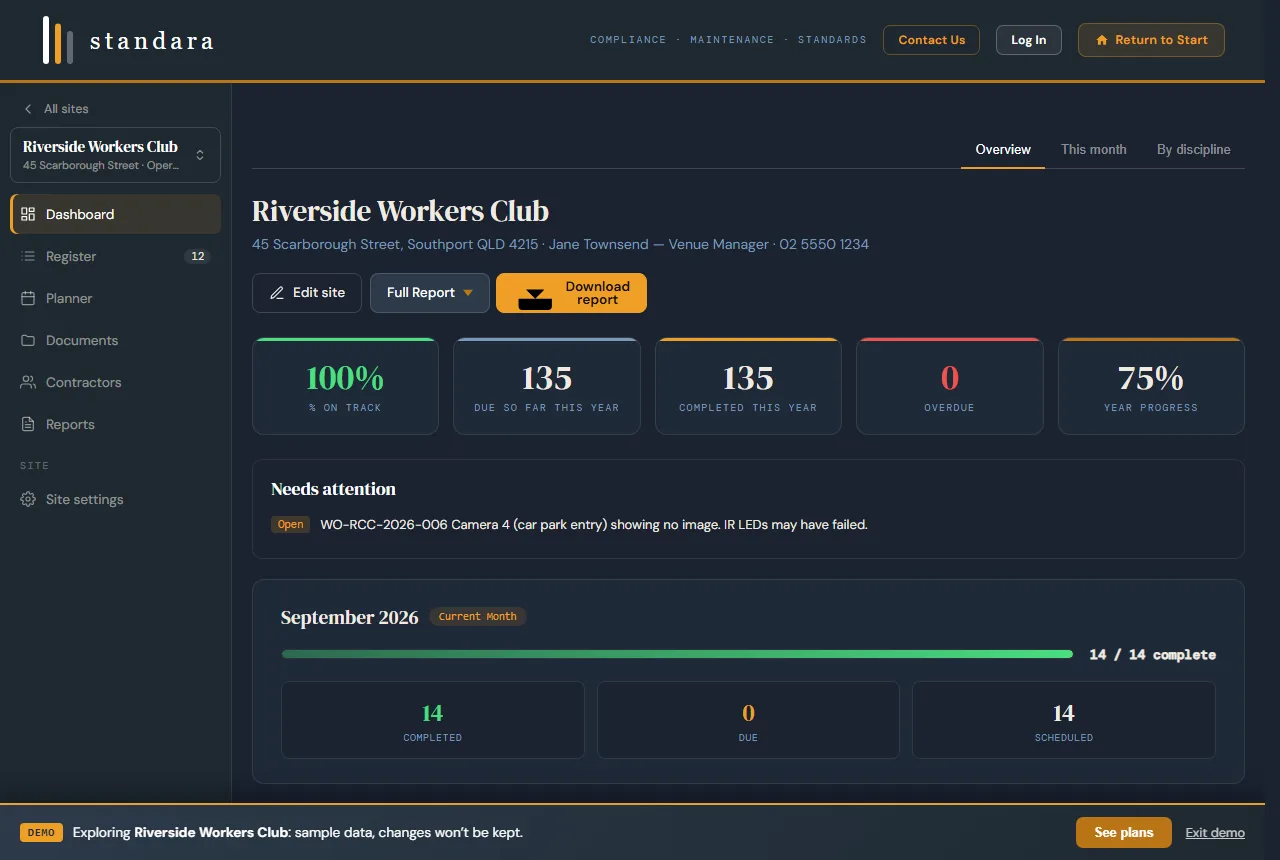
The site dashboard: on-track status, what is due, what is overdue, and the needs attention list. Demo data.
What facility management software has to do for one building
- Hold the register. Every maintainable asset with its location, its discipline and the AS/NZS standard that governs it.
- Generate the schedule. The recurring tasks and frequencies for each asset, laid out as a 12-month planner, not typed in by hand.
- Name the contractor. One contractor per discipline, with their licence and insurance cover on file, and a scope of works they can be held to.
- Log the reactive work. Callouts with a work order reference, priority, cost and status, beside the planned work for the same asset.
- Keep the evidence. Service reports, certificates and photos filed against the discipline and the task they close out.
- Produce the record on demand. A compliance report the committee, the insurer or the auditor accepts without a covering explanation.
Standara does those six and stops. There is no dispatch console, no inventory module, no per-seat licence, no implementation project. A site is set up in an afternoon; a Capture engagement hands it over built.
How Standara compares
Against a CMMS (MEX, UpKeep, Limble and similar; do I need a CMMS?). A CMMS is a work-order system with the contractor at the centre and a price per user. It is the right tool for a maintenance department with technicians to dispatch. A one to three site manager uses a fraction of it and pays for every seat. Standara starts from the register and the standards, generates the plan, and treats contractors as people who execute against your scope.
Against a spreadsheet. A spreadsheet holds what you type into it. It does not know that a fire indicator panel is governed by AS 1851, cannot generate a frequency, and produces no report an insurer accepts without questions. Standara's library carries 78 asset types across 11 disciplines with 350+ recurring tasks and 40+ AS/NZS standards referenced by designation. Paste your existing spreadsheet and the standards mapping is done for you.
Against a fire contractor's portal. Uptick, Taskr and their peers are excellent for the fire contractor's own compliance workflow, and they stop at fire. Standara covers every discipline in the building and belongs to the owner, not the contractor.
Who it is built for
Clubs and RSLs
Kitchens, cool rooms, gaming floors, lifts and function spaces put every discipline in one building. The board asks about fire safety, the insurer asks about maintenance records, and the AGM asks about the capital plan. One register answers all three. Standara for clubs.
Strata and body corporate
The committee changes; the building does not. A standards-mapped register gives each committee the same starting point and gives the strata manager a maintenance plan that survives the AGM. Where the purpose calls for it, condition ratings and a 10-year capital forecast sit on the same asset base. Standara for strata.
Commercial property
Owners and property managers with one to three sites need a defensible maintenance record without a corporate system. Each site is held and exported separately.
Builders at handover
On the Professional plan a site can start as a construction project: commissioning records, statutory items, defects and the DLP register, then one click at Practical Completion into an operating register the owner takes over. How the construction module works.
What is included
- Asset register with 78 asset types across 11 disciplines, each mapped to its governing AS/NZS reference
- 12-month PPM planner generated from the register, with year tabs and carry-over
- Contractor assignments per discipline and a contractor directory with licence and insurance cover
- Full and summary compliance reports as PDF; the schedule as Excel or CSV
- Australian-hosted data, autosave and cloud sync across devices
- Up to three sites, team members with owner, member and viewer roles
- Reactive callout log with work order references, service documents by discipline, scope of works export
- Commissioning and handover module for new builds
- Enterprise: larger portfolios, white-label and single sign-on, by quote
Pricing
Prices in Australian dollars, plus GST. Standard is $149 per month or $1,489 per year for one site. Professional is $399 per month or $3,999 per year for up to three sites. Enterprise is by quote. No lock-in on monthly plans. Compare the plans.
Prefer it built for you?
Standara Capture is the done-for-you path: a practising facilities manager walks your site, captures every maintainable asset, builds the standards-mapped register and the planner, and hands it over live. Fixed quote after a short scoping call, servicing NSW and South-East Queensland. Request a scoped quote.
Common questions
Is Standara a CMMS?
No. A CMMS is a work-order system built around contractor dispatch and priced per user. Standara is built around the owner's register and schedule, priced per site. It covers the planned maintenance, the reactive log, the documents and the reports a one to three site manager needs, and leaves out the dispatch machinery most of them never use.
Does it work for a single building?
Yes. The Standard plan is one site, with the full register, the 12-month planner, contractor assignments and the compliance report.
Can my contractors use it?
Contractors are assigned per discipline and receive their scope of works and schedule as exports. Team members with a viewer role can log in and read every site and report without changing anything.
Where is the data hosted?
In an Australian region. Sign-in uses encrypted authentication hosted in Australia, uploaded documents sit in a private access-controlled bucket, and site registers sync to Australian-hosted cloud storage.
Related
- Planned preventative maintenance software: what PPM software has to do and how Standara does it.
- Asset register software: the register that drives the planner, and how to get an existing list in.
- How to build a facilities asset register: the field list, the classification method and the review cycle.
- Electrical testing schedule: how often RCDs, plug-in equipment, switchboards and emergency lights are tested, and which rule sets each interval.