Written from the site walk, not the manual. Robert Hunter has built registers for licensed clubs, strata schemes and commercial buildings across 25 years of facility and project management, and Standara is the tool that came out of it.
What the register has to answer
The test of a register is not its length. It is whether the document alone answers six questions: What do we have? Where is it? Which standard governs it? What maintenance does it need, and how often? Who does it? When was it last done, and where is the evidence?
A committee, an insurer, a fire safety practitioner and a buyer's due diligence team all ask versions of those six. A register that answers them is a compliance record. A register that does not is a list.
Step 1. Define the scope
A maintainable asset is any item of plant or building system with a service requirement or a statutory inspection. For a club, strata scheme or commercial building that usually means:
- Fire detection and alarm systems, extinguishers, hydrants and hose reels, sprinklers, fire doors
- Emergency and exit lighting
- Mechanical ventilation, air conditioning and kitchen exhaust
- Refrigeration, cool rooms and ice machines
- Switchboards, RCDs, emergency generators and UPS
- Hot water systems, backflow prevention devices, pumps and thermostatic mixing valves
- Lifts, escalators and platform lifts
- Roller doors, access control, CCTV and intruder alarms
- Roof, facade, waterproofing and structural elements with an inspection cycle
- Playground, gym and leisure equipment where the venue has it
Leave out furniture, fittings and consumables unless you are tracking them for capital planning. Decide the disciplines before the walk. Standara organises assets into disciplines such as fire and life safety, mechanical and HVAC, refrigeration, electrical, hydraulic and plumbing, vertical transport, security and access, and structure and fabric. Using the same list in the field and in the register removes the sorting job later.
Step 2. Walk the site and capture each asset
Capture the same fields for every asset. These are the columns of the register:
- Asset ID. Unique and sequential per site. Never reuse a number.
- Asset name and class. The generic class (fire indicator panel, split system, backflow device) plus the site's own name for it.
- Discipline. From the list you fixed in Step 1.
- Location. Building, level, room or zone. An asset without a location cannot be found by the next person.
- Make, model and serial number. From the nameplate.
- Install year, or an age band where the nameplate is gone.
- Quantity. Count identical units rather than listing each one.
- Condition. A rating on a fixed scale, one to five, with the scale written on the register.
- Nameplate photo. Taken before anything else.
- Notes. Access requirements, isolation points, visible defects.
The Standara asset register template (Excel, or CSV) carries exactly these columns with six example rows and a sheet explaining each field.
Walk by zone, not by discipline. Every plant room, roof and riser gets visited once and everything in it is captured together. Record "not accessible" rather than guessing, and come back with the key. Photograph the nameplate first; it settles make, model, serial and often the install year in one frame.
Step 3. Classify and map the governing standard
Each asset class maps to the Australian or New Zealand Standard that governs its maintenance. Record the standard by designation. The maintenance requirements themselves stay in the standard; the register points to it. Typical mappings:
- Fire detection and alarm systems, extinguishers, hydrants and hose reels, sprinklers: AS 1851
- Emergency and exit lighting: AS 2293
- Electrical installations and switchboards: AS/NZS 3000
- RCD and portable appliance testing: AS/NZS 3760
- Mechanical ventilation and air handling: AS 1668, with AS/NZS 3666 for microbial control
- Plumbing, drainage, hot water and backflow prevention: AS 3500
- Lifts and escalators: AS 1735
Some assets have no governing standard and are maintained to the manufacturer's schedule or the site's own risk assessment. Record that too. A blank in the standard column should mean "none applies", never "did not check".
Step 4. Set the tasks and frequencies
For each asset class, write down the recurring tasks, the frequency of each (monthly, quarterly, six-monthly, annual, or a multi-year cycle), the trade or licence required, and whether the task is statutory. Take the frequency from the referenced standard, the manufacturer, or the insurer or lease where they impose one, and record the source beside it.
Once the tasks and frequencies are against every asset, the register generates the maintenance planner: the 12-month calendar of what is due, by discipline, by month. That planner is the document the contractors work to and the committee approves.
Step 5. Assign responsibility and a place for the evidence
Assign a contractor to each discipline, not to each asset. Record where each completed visit is evidenced: the service report, the certificate, the test tag, the photo. A completed task with no report reference is an unproven task.
Decide how a completion is recorded: the date, who attended, the report reference and any defect raised. The same record, kept every time, is what an auditor reads twelve months later.
Step 6. Keep it live
A register built once for an audit and never touched is out of date within a quarter. Update it when:
- a reactive callout replaces or repairs an asset;
- capital works add, remove or upgrade plant;
- a new building or extension is handed over at Practical Completion, when the commissioning records and warranties become the register;
- the annual review runs, when conditions are re-rated and end-of-life items move into the capital plan.
Date the register and keep a change log. A committee that can see the register was updated on 14 August 2026, and why, trusts the rest of it.
Common mistakes
- Listing by contractor invoice rather than by asset. The register then reflects who was paid, not what exists.
- No location. The next manager cannot find the asset, so it is captured twice or not at all.
- Frequencies copied without a source. Defensible on the day; indefensible when questioned.
- Evidence in three places. Photos in a phone, register in a spreadsheet, certificates in an inbox. The audit takes a week instead of an hour.
- One version, never dated. Nobody can say what changed or when.
Doing it in Standara
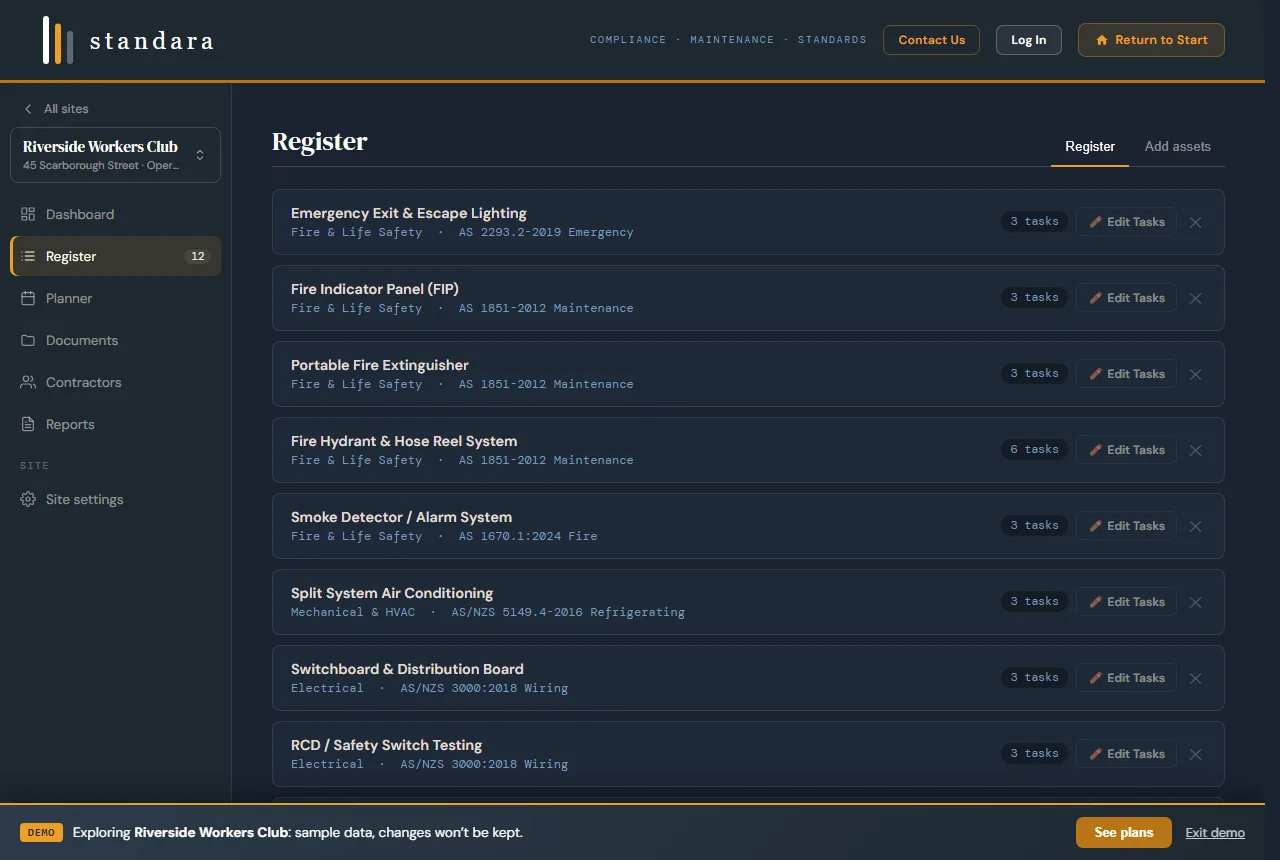
The register in Standara: discipline, governing standard and task count per asset. Demo data.
Standara holds the register described above. Select from 78 asset types across 11 disciplines and the governing AS/NZS reference, the tasks and the frequencies are attached for you. The 12-month planner, contractor assignments, service documents and the PDF, Excel and CSV exports follow from the same register. How Standara handles planned preventative maintenance.
If you would rather not walk the site yourself, Standara Capture does Steps 1 to 5 for you: a practising facilities manager captures every maintainable asset, builds the register and the planner, and hands it over live in Standara. Fixed quote after a scoping call, servicing NSW and South-East Queensland. Request a scoped quote.
Related: asset register software and facility management software for Australian buildings.
You now have the field list, the classification method and the review cycle a defensible asset register needs.